MERCURY UPDATE | July 2026

This batch is heavy on the stuff many of you deal with every day: meeting export flexibility, checklists that export every line instead of just the ones you touched, and a pile of table/view changes to help you quickly find the info you want. Nothing here is flashy, but it's the kind of release where a dozen small annoyances quietly stop being annoyances. Read on for more details on the 50+ changes since the last update sent at the end of May. Make sure to get on the feature request board to tell us what you want to see next.
FEATURED CHANGES
Featured changes are those that came highly requested, have a significant impact on functionality, or we thought they were more exciting than the others.
Document Zoom
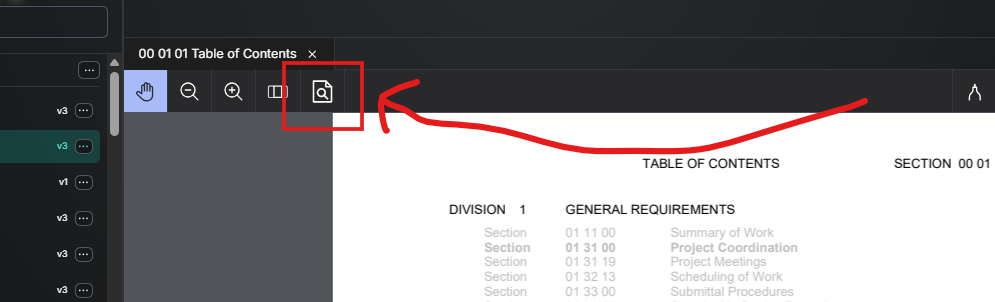
Added a setting to change the default zoom behavior in the document viewer instead of requiring Ctrl + scroll. Drawing default to zoom and specs can be toggled between scroll and zoom.
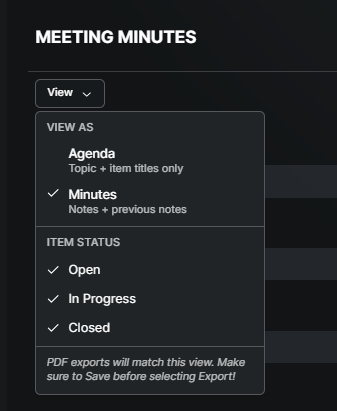
Meeting Minutes: Topic Input Gets View & Export Options
Exporting meeting minutes used to mean exporting everything — every topic, every item, every note, going back to day one. A few meetings that means a 15-page PDF. The Topic Input now has its own View dropdown with an Agenda view (topics and items only, no notes) and a Minutes view (topics, items, and notes with the prior week's carried forward), plus filtering by item status. Export now matches exactly what's on screen instead of exporting the entire history.
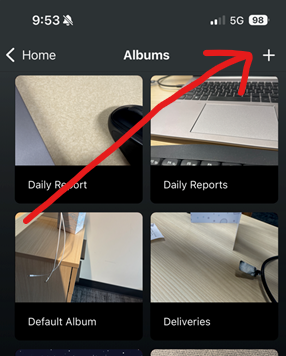
Mobile: Create Photo Albums
Creating a new photo album has always been a web-only action. Mobile now has the same "+" button and create-album flow as the album screen on web, so you're not stuck waiting to get to a laptop to organize photos taken in the field.
Checklist Items: NA Toggle
Marking a checklist item NA used to lock it permanently — no way to walk it back to Pass or Fail if you tapped the wrong button. NA is now a toggle: tap it again to undo, and the item opens back up for a normal response. Applies across Safety, Equipment, and Quality checklists.
Direct Links
MOBILE: Added deep-linking so tapping a Mercury notification from a mobile email app opens the Mercury app instead of a browser tab.
DESKTOP: Links in notification emails open the exact form after login instead of just opening to the Mercury home screen.
ENHANCEMENTS AND FIXES
Here are more changes made, grouped by where they can be found. Please reach out to pdesimone@shoestringvalley.com if you have any questions as to why and he will name names as to who requested them.
Documents & Exports
Fixed inputs hidden by a template's visibility settings still showing up as blank fields on exports — hidden inputs are now left out entirely.
Added a back-navigation fix for Public/Private folders so closing a file returns you to the subfolder you were actually in, not the top-level parent folder.
Pins on drawings and specs now open in a new browser tab by default, so you don't lose your place on the sheet you were viewing.
Fixed the Andersen logo missing from certain notification and export PDFs so distribution and export copies match.
Added an option to export a document's page using its own page name instead of the parent discipline name.
Fixed RFI answer PDF exports mangling bulleted responses into a single unreadable block of text.
Distributing a form to a group of people used to log it as multiple entries — sometimes with a blank "Distributed To" — making one send look like two or three. Distribution history now rolls a single send into a single entry, showing who it went to and what was sent, all in one line.
When multiple tabs are open in documents they can now be re-ordered (like a web browser).
Tables & Saved Views
Fixed the "Save view" dialog leaving the entire page unresponsive to clicks after closing, regardless of whether you saved or canceled.
Fixed the "Public" checkbox in the save-view dialog not toggling on, which made it impossible to save a shared view.
Fixed number columns in form tables sorting alphabetically instead of numerically.
Fixed a filter crash when submitting a column filter with a value entered but no filter type selected.
Added an "Open" status option and other filters to mobile form tables.
Added a filter for Inspection Origin so checklist-linked forms can be filtered by response type.
Added a confirmation dialog before deleting a report — this was previously an instant, un-undoable delete.
Added the option to re-order columns and have those changes included in the saved view.
Fixed duplicate legacy columns showing on the RFI tool home screen from old form updates.
Added the View options to table that displays multiple templates.
Mobile
Fixed the Android app switching to light mode on its own after certain OTA updates.
Fixed low-contrast checklist item responses that were hard to read against the background.
Added the ability to search for an assignee by company name, not just by person, on mobile.
Added mobile support for going back into a Planned Checklist without restarting it from scratch.
Fixed a recurring, hard-to-reproduce crash affecting nightly-shift users filling out dailies or uploading photos late in the evening.
Checklists
Checklist exports were only including line items you'd actually interacted with — so an incomplete checklist looked "done" on paper. Every line item now exports regardless of whether it's been touched.
Added search to the Checklist Item Library so items are findable now that the list runs into the hundreds.
Fixed Quality Metrics not updating the Overdue Corrections date when a quality observation's due date is changed after publishing.
Fixed the Selection Set edit screen hiding sets you were trying to edit from a long list.
Fixed saved selection sets not being editable after creation.
Added an easier way to roll a template update out to many existing projects at once, instead of syncing project by project.
Fixed a "Please Save" overlay incorrectly appearing over checklist items in the customer-level template editor.
Added a warning when navigating away from the Template Editor with unsaved changes.
Fixed the Publish button requiring admin-level permissions when it should have been available to anyone with Create access.
Fixed the Planner Group location not displaying at the form level, only at the group level.
Assignees, RFIs & Submittals
Fixed the "Allow Edit" workflow-change permission not functioning for assignees on submittals.
Fixed the user selection dropdown in the Distribute modal not responding to clicks.
Fixed the assignee/user picker in workflow and simple-assignee editors not accepting scroll or search input inside modals.
Resolved a batch of workflow compilation errors that were showing a hazard icon on assignee-based forms.
Meeting Minutes
Fixed a save conflict where two people editing the same meeting at the same time could silently overwrite or lose each other's notes.
Directory & Notifications
Added a way to resend the project invite email without recycling and re-adding the user.
Fixed new users being blocked from being added when their name closely matched an existing contact.
Fixed pasted text becoming invisible in notification emails due to inherited formatting/color.
Fixed custom email notification bodies missing available input fields, so more of the form's data can be included in the message.
Moved the "form uploaded"-style process notification so it no longer covers the Save/Publish buttons.
When a person is added to a project directory, their company is automatically added to the Companies tab of the directory.
Photos & Todos
Added the active album's name being displayed while viewing photos inside it.
Fixed manual todo titles not saving when edited (description, due date, and priority already saved correctly).
Removed the restriction preventing form-linked todos from being manually closed.