MERCURY UPDATE | October 13, 2025

As you can tell by the pumpkin building and robots taking our jobs, it’s almost Halloween, and we can’t stop thinking about AI! There are so many updates are happening each week, it was hard to stop adding to the list! We have more Featured Changes than ever before, representing the volume of work being done and the progress being made. We really appreciate all 8 of you reading!
FEATURED CHANGES
Featured changes are those that came highly requested, have a significant impact on functionality, or we thought they were cooler than the others.
Online Orientation now available in English and Spanish
Role based High level walk through of all the distinguishing features
Based on role (GC, Trade, Design/Client)
Linked from the Docs
We hope this will remove the burden of our Andersen people having to orient our external partners. Here’s a link to check it out now → Online Orientation.
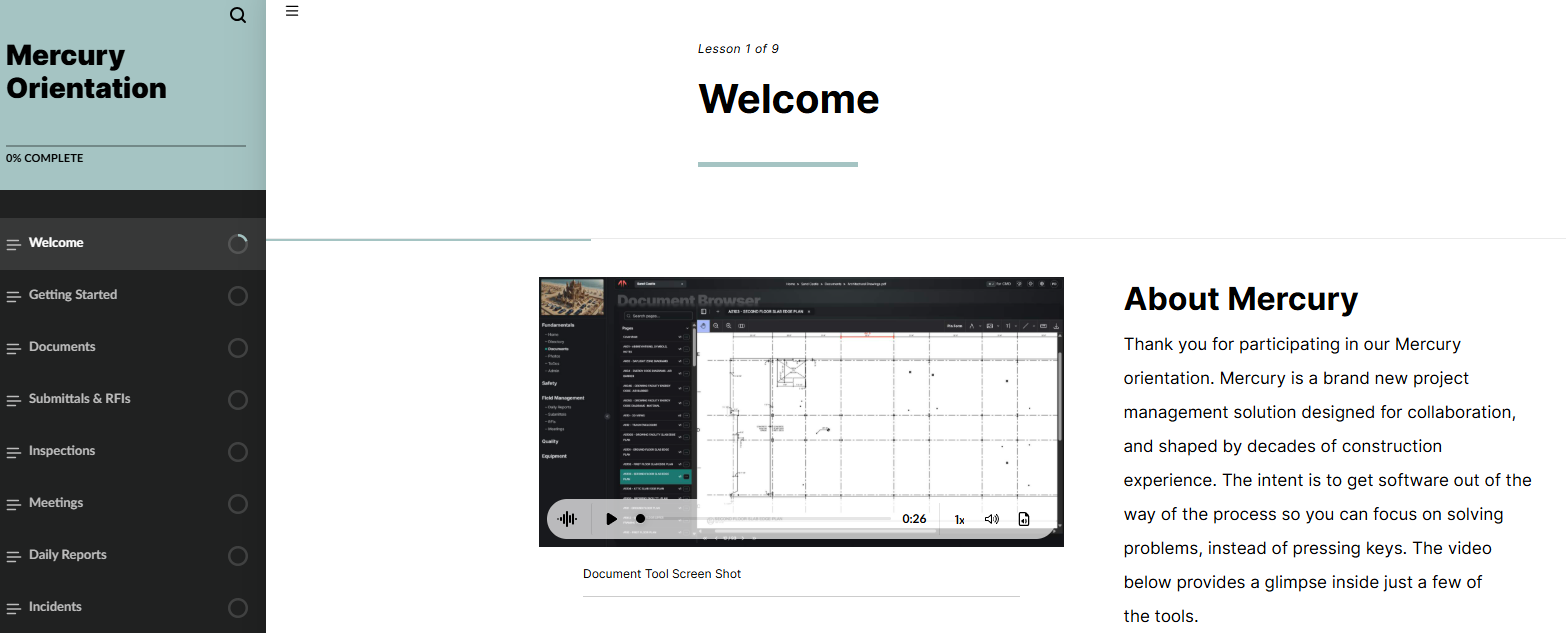
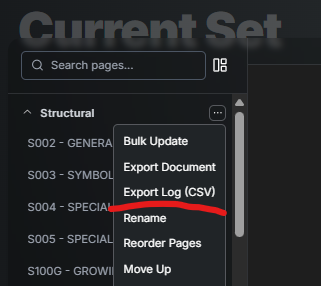
Exhibit 3 Export to Excel
From any Drawing or Specification
Matches the Exhibit 3 format
Current drawing or spec list with page name, version, date, etc.
To make this a complete feature, there are also changes to the uploading and replacement of documents to provide a place to enter information like version and date. Find more detail in the docs article Export Drawing or Spec Log.
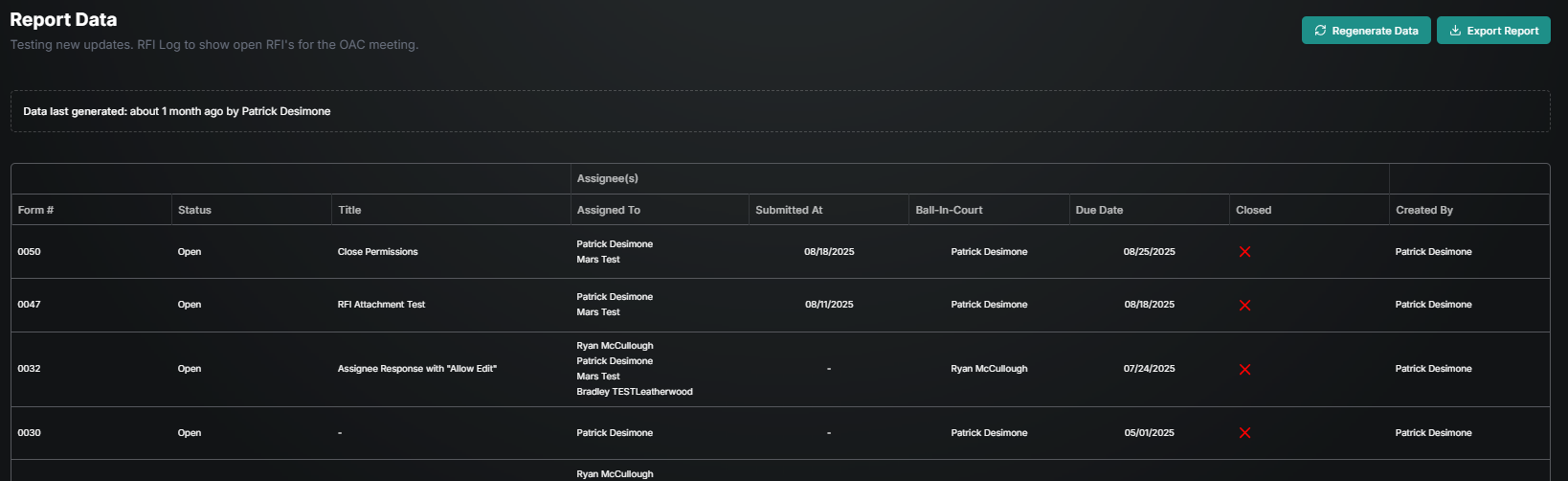
Report Builder [BETA]
Found under the Options button on any template
Create and save your favorite views that remove and re-order the columns in the way you want.
Can be automatically distributed via email on a frequency you choose or just exported to PDF on demand.
We are calling this BETA since reporting represents a nearly unlimited list of potential features, but we wanted to get it in your hands prior to the long hours of adding every possible feature. Examples of a report would be a list of open observations or an open RFI log. Find more detail in the docs article Reports [BETA].
MSR Safety Metrics now Available
Select the metric you’d like to see, and a table will generate below
Can be distributed automatically (subscription) on a frequency you choose to remove the added step of hitting export or just wanting a specific snap shot in time.
Find more detail in the docs article Safety Metrics.

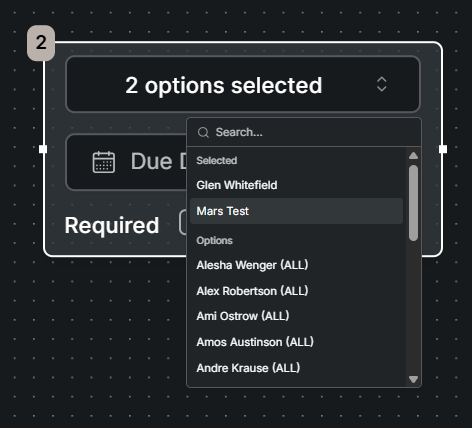
Assign Multiple | Assign Either | OR instead of AND
Assign something to multiple people to one step in the workflow.
This allows the ball to move forward if ANY of those listed respond.
This another avenue to avoid the ball getting stuck in the court of one person. Find more detail in the docs article Assign Either.
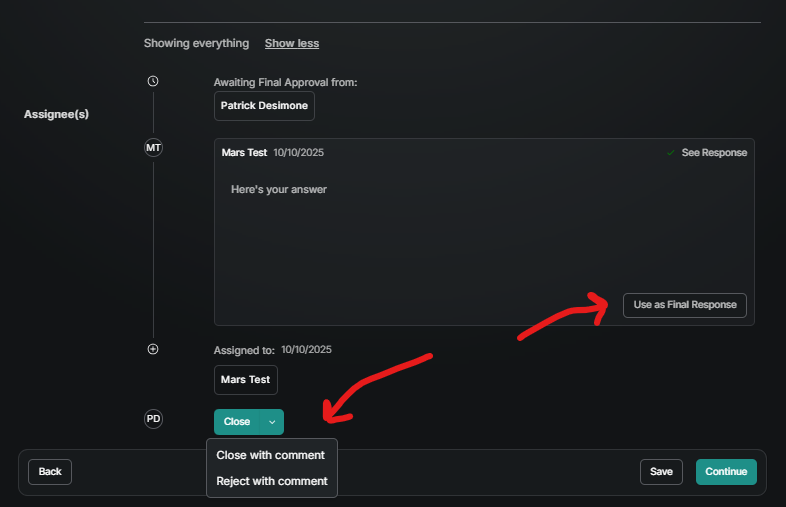
Workflow Final Response when Closing a form
When the last person responds, the ball automatically returns to the court of the creator.
They have the options of Close, Close With Comment, or Reject With Comment.
They can also choose one of the multiple responses in the workflow as the “final response”.
This allows the creator of the form to have the final say and make sure the answer is clear without adding themself to the end every workflow. Find more detail in the docs article Assignees>Final Response.
Assignee Permission to Change Workflow
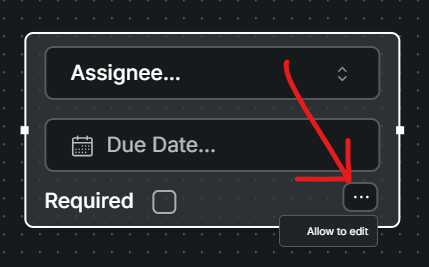
Use the “allow edit” option to assign someone who may need to change the workflow.
For complex assignees only
It removes the pressure of know all who need to review prior to publishing and avoids having to open up too many permissions just to allow a workflow change. Find more detail in the docs article Assignees>Allow Edit.
ENHANCEMENTS AND FIXES
Great to see you made it this far down the page. Here are more changes made, grouped by where they can be found. Please reach out to pdesimone@shoestringvalley.com if you have any questions as to why and he will name names as to who requested them.
Documents
Upload Symbol Fix: When uploading a PDF as a Drawing or Spec, symbols in bookmarks will now come thru into the page names accurately.
Document Type Upload Fix: PDFs uploaded as Documents to the current set now have all the same Rename, Delete, and Move options as Drawings and Specifications.
Current Set Folder Options: Folders in the Current Set now have all the same Rename, Delete, and Move options as the Private and Public Folders.
File Visibility Fix: You can now scroll down for days when you need to store MANY files in one folder.
Export All: Whether requested by a client or ready for close out, you can now do a mass export from any tool. For example you can get a PDF copy of all drawings or every RFI sent to a zip file.
Mobile
Delete Photo’s: Photo’s can now be deleted from mobile.
Time Input Fix: The time input no longer causes an error in the mobile app.
Planner Tool Fix: When an extremely long planned checklist is created the scroll down now works correctly.
Photo Upload Speed: When using the camera tool, the photo’s now upload in the background so you don’t have wait to take the next picture or move to another task.
Album Selection: When using the camera tool, you now can select the album prior to taking the photo.
Upload Multiple: When uploading pictures from your phone or tablet camera roll, you can now select multiple.
Android Arrow Fix: The arrows for jumping pages now work as expected.
Inspections
QR Code Defaults: QR Codes can now carry defaults to allow the form header to be partially filled out. For example the QR code on the forklift will have the SDS Equipment box checked and equipment number already filled out when the inspector scans it so they don’t have to type/check it every time.
Reject Option (Simple Assignees): Now when a response to an observation is not sufficient, the person who created it can reject the response and ask for a different answer. The reject button puts the ball back in the court of the person originally assigned.
Daily Report
Export Improvements: When export a Daily to PDF, the header now includes the date the report was made.
Photo Export Fix: When dailies are exported, photos are now stapled to the end of the PDF.
Desktop Photo Album Fix: Any file type can be uploaded from desktop, but only photo’s (.jpg, png, etc.) will get pushed to the Daily Report Photo album.
Meetings
Export Improvements: The PDF now includes more detail like Responsibility, Status and Due Date for each Item.
Add Attendee Fix: You can now add unlimited attendees to meeting minutes who are not listed in the project directory.
Reports
Export Fix: All fields/columns are now included in the PDF export of Reports
Date Missing Fix: All fields from the form being reported on now display in reports and tool home pages.
Missing Company Fix: When a company is not entered into the Workforce (Manpower) it will simply say Company on screen and be blank in the export instead of Loading.
Daily Incident Report: A summary of all incidents is sent to EHS and Risk leaders every day at 6am to make sure the email notification from when it was published was missed.
Directory
Company Directory Fix: There is no longer a limit to the number of companies in a project directory.
Home
To Do Titles: The items in your To Do list now include the title of the form so it’s easier to tell them apart when there are many. For example, instead of RFI - Assignee Response Pending, it will say RFI #47 Flashing Details - Assignee Response Pending.
General
User Management: When a user is removed from Andersen AD, they are also removed from Mercury.
Notification Reliability: We discovered some weakness in how notification emails were sent out and put in place a belt, suspenders and two more belts to make sure there is no doubt nonfictions are being sent or if they are not we know immediately.
Form Edit Button: After choosing to View a form, there is now an Edit button in the upper left to quickly switch from viewing to editing.
Voided Forms: Voided forms will now not show up in the Planner interface but will still be visible in the table view, even if the group they came from is recycled.
MERCURY USER INNOVATIONS
THIS IS WHY WE CREATED MERCURY! These are the tools that our own users have thought of and created on their own. Seriously, no software engineers were involved in creating the following:
SWIPP Inspection on Mobile: Many have had the responsibility of being the CESCL for a project, doing the inspections, and having to show that inspections have been taking place. The Kaiser team created a template in Mercury that allows this inspection skip the PDF or paper form and be done on a phone or tablet. They started with the Daily Report template that includes weather and defaults to the current day and then added checklist items from the AJH papers. Which is an incredible combination of tools we did not think of! It includes the ability to assign and track corrections via observations and a way to show/export a log of inspections.